Engineering · Kazakhstan · 2026
LEP Expert.
A site that helps sell complex services.
From first impression to repeat contact: video, interactive map, estimate calculation and own mailing service.
Open website ↗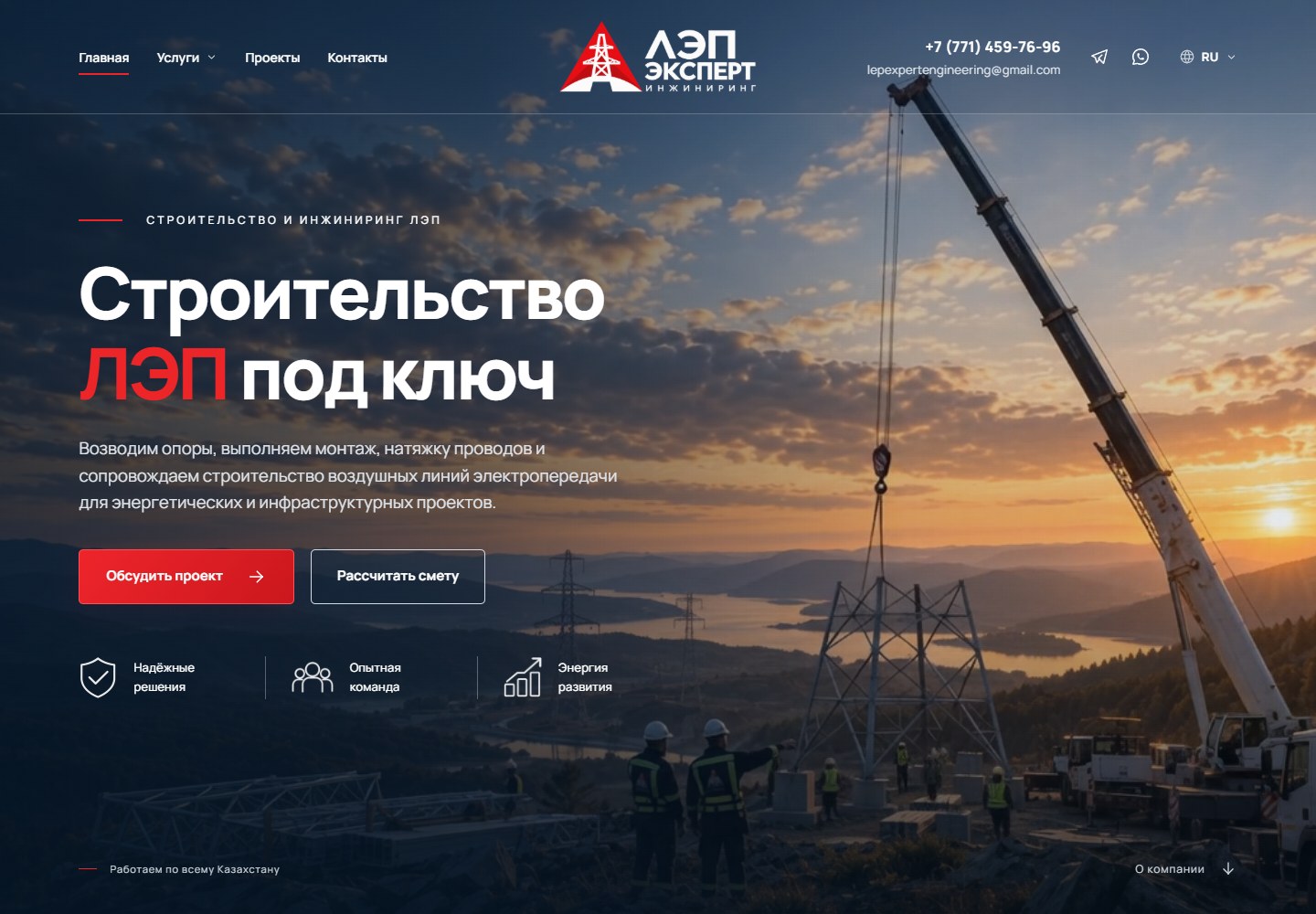 LEP Expert / Digital Customer Journey
Business challenge
Help the customer figure it out.
Give the sales department something to talk about.
In engineering projects, a long time may pass between the first site visit and the contract. The customer needs to understand the company’s competencies, scope of work and budget. We built the site around these questions.
Briefly. For power lines, Expert developed a website with an interactive presentation of services, a calculator and a clear call script. An additional account combines contacts and mailings so that the company can continue the dialogue with subscribed clients.
Visual language
Scale.
Structure.
Accuracy.
Large headings highlight engineering tasks. Short explanations help to understand the composition of complex services.
The dark base maintains the technical character. The red accent highlights the action, while the light surfaces give the text space.
to project details.
The video shows the scale of the work, the interactive map reveals directions, and the stages and calculator organize the path to appeal.
01 / Video
Show scale. Get attention.
The videophone takes the visitor into the context of power line construction even before the first conversation with the engineer.
On the first screen we combined a dynamic scene, a clear offer and two scenarios: discuss the task or proceed to calculating the estimate. The video creates an impression of scale, and the text explains what exactly the company offers.
It is easier for the visitor to understand the contractor’s specialization and choose the next step. Attention is drawn to a specific continuation - an appeal or calculation.
02 / Interactive map
Complex services - on a clear map.
Instead of a long list of engineering terms, there is a single interactive scene with six areas of work.
The visitor selects an object on the diagram or an item in the menu. The map reveals the relevant service: from the design of overhead and cable lines to surveys, approvals and supervision. A moving electrical impulse connects objects into one system.
The client finds a solution to his problem faster. This helps move from general interest to a substantive conversation about the project.
View map with selected service
03 / Calculator
Turn a price question into a request with parameters.
The calculator leads the client from the characteristics of the line to the calculation of design work.
The path is divided into three steps: line, conditions and contacts. The user selects the design, voltage, length and additional parameters. An estimate with calculations is provided and a PDF is sent by email - a useful document that you can return to when discussing the budget.
The manager receives the submitted application with initial data. Less time is spent on initial clarifications, more time is spent on preparing a proposal for a specific task.
04 / Work steps
Remove uncertainty before the first call.
The collaboration process is shown through the assembly of the support: from the base to the finished structure.
The four states of support accompany four steps: discussing the task, making a commercial proposal, developing a project and communicating the result. An animated line connects the steps and helps you read the sequence.
The client understands in advance what will happen after the application, when the conditions are discussed and what result he will receive. A clear process reduces the barrier to starting collaboration.
05 / Additional service
Apply today.
The reason to return is tomorrow.
Your own mailing account helps you work with your client base after the first contact.
Contacts from successfully submitted forms and calculator are saved in the database. The manager selects subscribers, prepares a letter, attaches an offer or presentation, and checks the newsletter before launching. The sending goes through the queue, and the history shows the processing status.
This allows you to return with a relevant offer to those who have already expressed interest, but were not yet ready for an agreement.
Contacts remain in the system
Repeated requests will be contacted by email. The application source and consent status help guide further work.
There is a reason to continue the dialogue
A new case, list of services or proposal with a PDF attachment reminds you of the company at the time of project planning.
Dispatch arranged
Subscriber selection, pre-check, individual letters, queue and automatic unsubscribe link.
Opportunity for sales growth
The company receives a tool for re-contacting with an interested audience. A new contact can begin with an email to an existing subscriber, and not just with a new ad click.
What does the business get?
Each decision continues the path to a deal.
Video and offer explain the company's specialization.
The map and steps help you choose a service and understand the process.
The calculator turns interest in price into a subject request.
The newsletter allows you to continue the conversation with the subscriber.
The case shows the implemented tools and their role in sales. The quantitative growth in applications and revenue has not yet been confirmed by analytics. To assess the effect, you need to compare calculations, submitted applications, responses to mailings and concluded contracts.
About the solution
Questions about the project
Is the site available in multiple languages?
Yes, the site is designed in three languages so that customers can get acquainted with the company’s services in a language convenient for them.
Why did you make an interactive map?
It links engineering services to understandable objects and allows them to be studied in the context of a single scene. This helps the visitor choose the right direction.
How is the calculator useful for the sales department?
He structures the client’s initial data before talking with the manager: line type, voltage, length and project conditions.
What does the mailing service provide?
The ability to send new offers and materials to subscribed clients, select recipients and track the processing of letters in the queue.
Does the newsletter work after the account is closed?
A server scheduler is provided for background sending. Its configuration and acceptable sending speed depend on the hosting.
Can this approach be used in another industry?
Yes. The interactive presentation, calculator, and follow-up communications can be tailored to the product, deal cycle, and customer questions.
Feedback
The result through the eyes of the client.

IP "LEP Expert Engineering"
Design of power lines«We especially appreciate attention to the specifics of our work and the willingness to refine details based on feedback.
MetaWeb helped to think through not only the appearance of the site, but also how it would be used by customers and company employees.»
Let's discuss your task
Where does your site lose
future deals?
We will analyze the client’s journey and offer solutions for applications, processing requests and repeat sales.
Discuss the project